


Opera: Private Web Browser
4.899.35K Reviews
App Specs
- Version
- 100.2.5122.89341
- Updated On
- License
- Free
- Downloads
- 500,000,000+
- Developer
- Opera
- Categories
- Communication
- Platform
- Android, iOS
Screenshots


 Analysis by AppCompare
When several people share a phone or tablet, the browser can become a small but important household boundary. One person may be checking a recipe while another needs a school page, a travel detail or a link sent from a computer. I find Opera: Private Web Browser most useful when I want a capable everyday browser with privacy-minded tools close at hand, but I would not treat it as a substitute for separate user profiles or a family-management system.
One browser, several kinds of browsing
A shared device makes convenience and privacy pull in opposite directions. It is easy to hand over a phone with a page already open, but that also means the next person may encounter tabs, suggestions or account sessions left by the previous user. A browser can help with a more deliberate routine, yet it cannot decide who is holding the device or create household account boundaries on its own.
For example, imagine I am using a tablet to follow a dinner recipe, then a child borrows it to look up a class topic, and later another adult needs to check a booking. Opera can serve as the common place to open those pages, while the people using it still need to be thoughtful about what they leave open and which accounts they use. I would close sensitive pages and sign out of personal services before passing the device along. That simple habit matters more than assuming a privacy feature will separate one person’s activity from another’s.
Set expectations before handing over the device
Opera is made by Opera and sits in the communication category, though in daily use it is a web browser rather than a messaging app. That distinction is useful in a household: it can open information and web services, but it does not coordinate who gets the device next or manage family schedules. I like it as a practical tool for finding and revisiting pages, not as a shared-device organizer.
Its customization can make the browser feel more comfortable for the person who uses it most. On a device that changes hands, however, a personalized layout may also make it feel as though the browser belongs to one person. Before sharing, I would agree on a few basics: avoid saving someone else’s login, close private tabs when finished, and check which account is active before submitting a form. These are small steps, but they prevent the common mix-up of one person’s search or account being mistaken for another’s.
Keeping household browsing in step
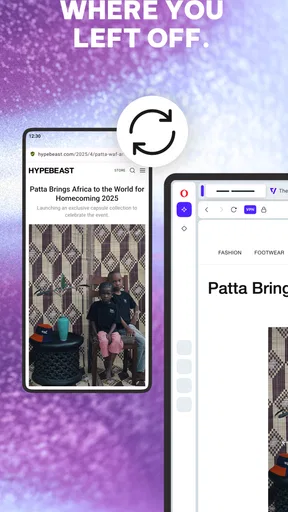
Opera’s My Flow feature is intended to make it easier to continue between a phone and a computer. I see the clearest household use when one person is researching on their own devices: a page found on a phone can be useful to pick up later at a desktop, rather than searching for it all over again. It can also help when I am comparing options over several short sessions, such as reading about a purchase while away from home and returning to the details later.
That continuity should not be confused with sharing a family workspace. If different people use different accounts or devices, each person should be clear about which device and browser session they are using. Passing a link along directly is often a better choice than relying on another person to find it in a shared browsing history. My Flow is most valuable as a personal handoff across devices, not as a way to merge everyone’s interests or keep a household’s plans synchronized.
Worth Reading Before You Choose

Flipboard Shows What News Apps Must Do Beyond the Feed

Switching to Android Auto Means Rethinking Your Driving Routine

Google Calendar Makes a Crowded Week Easier to Manage

Ludo King Makes the Most of the Minutes Between Plans

Baby Panda World Brings Quick Play to Modern Phones, but Its Game Library Feels Busy

ESPN’s Live Game View Makes Following Close Games Easier
Age, trust and realistic privacy
The app is rated for Everyone, which makes it broadly suitable from an age-rating perspective, but an age label is not a replacement for supervision or household rules. A browser can take someone to a wide range of online material, and parents should make decisions based on the child, the device and the family’s expectations. I would not assume that the app’s privacy tools filter content or provide parental controls.
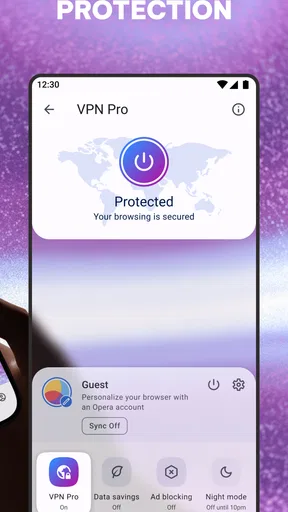
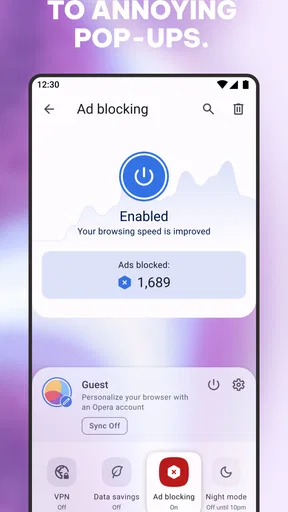
The built-in VPN and ad blocker are attractive conveniences, especially if I want fewer disruptive page elements or an extra privacy-oriented option without adding another app. Still, I would avoid treating a VPN as complete anonymity or as protection from every online risk. It does not remove the need to think before signing in, sharing personal details or opening an unfamiliar page. For children and less experienced users, a brief conversation about those choices is more useful than implying that a browser can make every visit safe.
How Opera fits into everyday use
I find Opera most useful when I treat it as a personal browser that happens to live on a shared device, rather than as a shared household workspace. In this section, I’ll look at where its everyday convenience can help and where a little care around accounts and open pages still matters. That distinction leads naturally to the practical question of how to set boundaries before someone else picks up the device.
A browser for people who want tools close by
The usual alternative is the browser already installed on a phone. That option can be a better fit if someone values a familiar interface, wants to keep their setup simple, or does not need a bundle of extra browser tools. Opera is more appealing to me when I want its combination of customization, ad blocking, VPN access and cross-device continuity in one place. Those features can reduce app switching, but they also mean there is more to learn and more settings to decide whether to use.
Opera is free to download, and its audience is substantial: it has passed 100 million installs and holds a 4.7 average from around 5.3 million ratings. It is suitable for everyone by age rating, and the current version is 93.4.4906.86552. Optional in-app purchases range from about $8 to $48 per item, so I would check the purchase screen carefully if I ever encountered an offer rather than assuming every extra is included. The app has been around since November 8, 2010, which gives it a long history as a mobile browser.
What I would check before making it my default
My practical test would be to use Opera for a few ordinary tasks rather than moving everything over at once. I would open the sites I visit most, try the toolbar and appearance options, and see whether the extra controls make browsing feel easier or busier. If the VPN affects a page or connection in a way I dislike, I would compare the same task with it off; privacy tools are useful only when I understand the trade-off they introduce.
I would also decide whether I really need cross-device continuity. If I browse mainly on one phone, My Flow may not change much for me. If I regularly move between phone and computer, it may save a few repeated searches. In a shared home, I would keep that feature tied to my own devices and avoid treating it as a common family inbox. That distinction helps preserve convenience without blurring whose browsing belongs to whom.
Where it may not be the right choice
Someone who wants the simplest possible browser may be happier sticking with the default option on their device. A person who prioritizes a tightly separated profile for each family member should look for a solution designed around separate users rather than expecting Opera to supply that structure. Likewise, anyone who needs active content restrictions for a child should choose suitable parental controls elsewhere and make sure they are configured at the device or service level.
There is also a judgment call around feature density. Opera’s range can be a strength for people who like to tune their browser, but a distraction for those who want to open a page and leave every setting alone. I would give it a fair trial if its privacy and convenience tools match a real need; I would not switch just because a longer feature list sounds impressive. The best browser is the one whose controls make your routine clearer rather than more complicated.
First impressions and user interface
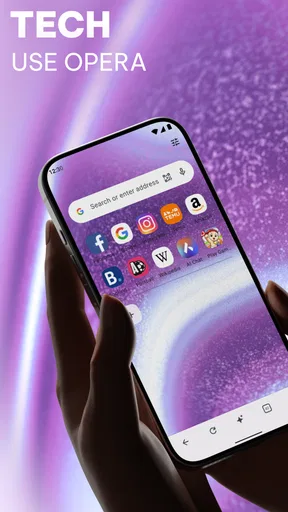
From the moment I launched Opera: Private Web Browser, I was greeted with a clean and intuitive design. The interface is sleek, with all the essentials neatly tucked into a minimalist toolbar. This makes navigation a breeze, even for those who aren't tech-savvy. I especially loved the customizable options that allow you to tweak the appearance and functionality to your liking. It's like having a browser that fits your personality.
Privacy and security features
In a world where privacy is a hot topic, Opera takes it seriously. The built-in VPN feature is a standout, allowing you to browse securely without any additional downloads or subscriptions. It's like having a digital invisibility cloak! The app also boasts an ad blocker that cuts through the clutter, providing a cleaner and faster browsing experience. No more annoying pop-ups or distracting banners. Just pure, uninterrupted surfing.
Performance and speed
When it comes to speed, Opera doesn’t hold back. Pages load quickly and efficiently, even when juggling multiple tabs. I tested it on various websites, and it handled them like a champ. The app also offers a "Turbo" mode, which compresses data and speeds up browsing, especially handy for those with slower internet connections. It's like having a turbocharged engine for your browser!
Unique features
Opera isn't just about the basics; it brings some unique features to the table as well. The "My Flow" feature allows seamless synchronization between your devices, making it easy to pick up where you left off, whether on your phone or desktop. It's like having your own personal assistant keeping everything in sync. Plus, the night mode is a blessing for those late-night browsing sessions, reducing eye strain with a softer, dark-themed interface.
Room for improvement?
While Opera excels in many areas, there's always room for a little polish. Some users might find the abundance of features a bit overwhelming at first. However, once you get the hang of it, you'll appreciate the depth it offers. I also noticed that while the VPN is useful, it can sometimes slow down the connection depending on the server location. But hey, no app is perfect, right?
In conclusion, Opera: Private Web Browser is a fantastic option for anyone looking for a secure, fast, and feature-rich browsing experience. Whether you're a privacy advocate or just someone who wants a smooth surfing experience, this app has got you covered. Give it a try, and you might just find your new favorite browser!
Pros
- Fast browsing speed with built-in ad blocker.
- Integrated free VPN for enhanced privacy.
- Customizable news feed with personal interests.
- Battery saver mode extends device usage time.
- User-friendly interface with smooth navigation.
Cons
- Limited VPN locations compared to standalone apps.
- Occasional compatibility issues with some sites.
- Less extension support than other browsers.
- Customizable features can be overwhelming.
- Syncing across devices requires an Opera account.
FAQs for Opera: Private Web Browser
How does Opera: Private Web Browser ensure user privacy?
Opera: Private Web Browser offers several privacy features, including a built-in VPN, ad blocker, and cookie dialog blocker. The VPN helps mask your IP address, ensuring your online activities remain private. The ad blocker removes intrusive ads, while the cookie dialog blocker reduces tracking. These features collectively create a safer browsing environment.
Is Opera: Private Web Browser free to use?
Yes, Opera: Private Web Browser is free to download and use. It offers all its privacy and security features without any cost. However, users should note that while most features are free, some additional services or premium features might require in-app purchases or subscriptions.
Can I sync my data across devices with Opera: Private Web Browser?
Yes, Opera allows you to sync your bookmarks, history, and other data across multiple devices. By creating an Opera account, you can easily synchronize your browsing data, ensuring a seamless experience whether you're using a smartphone, tablet, or desktop.
Does Opera: Private Web Browser support extensions?
Opera: Private Web Browser supports a wide range of extensions to enhance your browsing experience. From productivity tools to additional security measures, users can install extensions directly from the Opera add-ons store. This feature provides customization and additional functionality to meet individual needs.
What platforms is Opera: Private Web Browser available on?
Opera: Private Web Browser is available on both Android and iOS platforms. It is optimized for mobile devices, ensuring a smooth and efficient browsing experience. Users can download the app from the Google Play Store for Android devices or the App Store for iOS devices.


